Features

One all-in-one work platform for your whole team

RUQN brings project management, planning, team collaboration, meetings, and a full sales CRM into one connected workspace, and connects them, with AI across all of it.

No credit card required • Free plan, no time limit

Everything your team needs, in one place

From the first project plan to the closed deal, RUQN gives every team a single home for the work, no more stitching separate tools together.

Project Management

Plan, assign, and track every project

Organize work in workspaces, build task boards with the columns you need, and keep files attached to the work they belong to, so nothing slips between people or tools.

  • Workspaces, task boards, and custom columns
  • Statuses, priorities, owners, and due dates
  • File uploads on every task and Excel import

Explore project management →
Sales CRM

Run the full sales cycle where you deliver

Capture leads with rich detail, move deals through pipelines you design yourself, and convert a lead to a deal in one click, all connected to the projects your team delivers.

  • Leads and source tracking with CSV import
  • Multiple custom pipelines with weighted value and health
  • One-click lead to deal, companies and contacts
Explore the sales CRM →
Visual Planning

From a sentence to a full plan

Sketch ideas on an infinite canvas, or describe what you need and let AI build the board, then turn the plan into real, trackable work in the same workspace.

  • Infinite canvas: shapes, notes, connectors, tables
  • AI board generation from a single prompt
  • Roadmaps, workflows, sprint plans, and org charts
Explore planning →
RUQN AI

An AI teammate with real context

Because it lives in your workspace, RUQN AI acts on your real data, not generic answers. Qualify a lead, draft outreach, create tasks, or build a board, all within your permissions.

  • Qualify leads, draft outreach, suggest next steps
  • Create and update tasks, extract data from files
  • Build boards and plans, write docs, and research
Explore RUQN AI →
Meetings & Scheduling

Meet where the work already lives

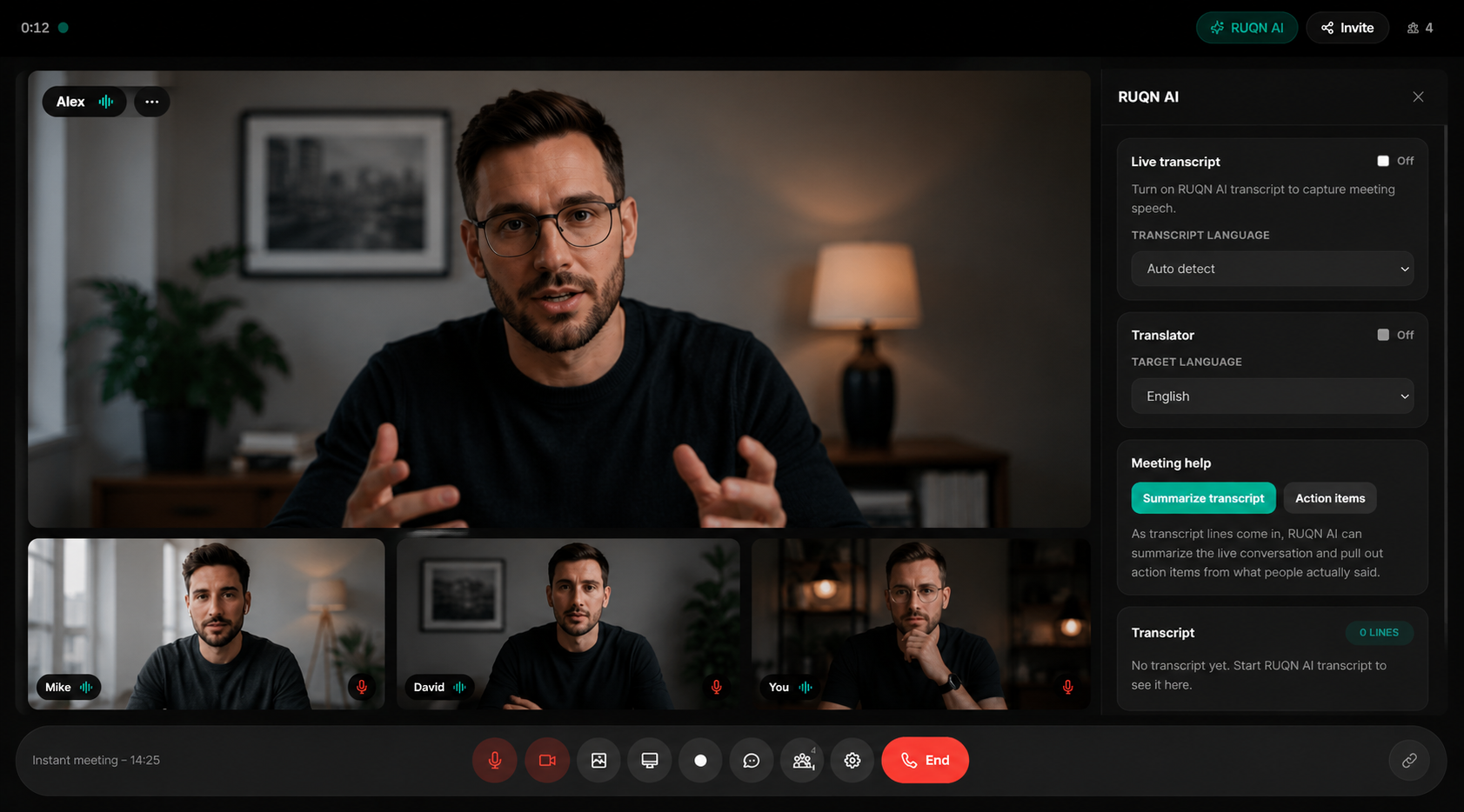
Schedule, host, and join meetings in Ruqn Meet or your existing Zoom, Google Meet, and Teams, then tie every call to the project or deal it belongs to, so notes and follow-ups stay attached to the work.

  • Ruqn Meet, plus Google Meet, Zoom, and Microsoft Teams
  • Booking links, events, and a shared calendar
  • Every meeting linked to a project or deal
Explore meetings →
Make it yours

Adapt every part of RUQN to how you work

Most all-in-one tools force their structure on you. RUQN bends to yours, rename labels, pipelines, stages, and entity terms, build custom roles, and start from ready-made industry templates, without touching your data or permissions.

See what each plan unlocks →

Enterprise-grade control, on the plans that need it

You decide exactly who sees what. Map roles to teams so members inherit access automatically, with read-only and full-edit roles enforced on the server, not just hidden in the UI. A full role access matrix, an audit log, and protected data controls back it up. Learn more on security.

The RUQN difference

Everything you need, in one place

Stop juggling tools and start running your business.

With five separate tools
5+ logins and 5+ bills every monthWasted time, added cost, and unnecessary complexity.
Data copied between apps by handManual work leads to mistakes and outdated information.
Sales can’t see what delivery is doingNo visibility means missed updates and misaligned teams.
A rigid structure you must adapt toYour process bends to the tool, not the other way around.
AI that doesn’t know your workGeneric AI with no context on your projects or pipeline.
With RUQN
One platform, one login, one billSimpler, smarter, and built to scale with you.
One source of truth, updated onceReal-time data across your entire workspace.
Pipeline and projects in one viewSales and delivery stay aligned, always in the loop.
Rename and restructure to fit youFlexible by design. Built around how you work.
AI with context on projects & pipelineSmarter insights from the work happening inside RUQN.

Everything connected. One source of truth.

In RUQN, projects connect to the teams running them, the meetings where they’re discussed, the tasks that move them forward, the deals that fund them, and the analytics that measure them. Because it all lives in one platform, an update in one place shows up everywhere, so your team works from a single source of truth instead of copying data between tools.

How RUQN works

Getting started doesn’t mean a long implementation project. You shape the workspace around your team, bring everyone into the same system, and watch the work, the pipeline, and the conversations stay connected from day one.

Project AlphaTemplate
To do
In progress
Done
1.

Set it up your way

Start from a ready-made industry template or a blank workspace, then rename sidebar labels, pipelines, stages, and entity terms so the platform speaks your language. Build the custom pipelines, stages, and roles your team actually uses, and add the dropdown fields that match your process. Nothing here forces a rigid structure on you, and you can reshape it later without touching your existing data or permissions.

Learn about customization
Team
Q2 plan ready Q2 Plan.pdf
2.

Work together

Bring your people in, organize them into teams, and let access flow through team membership instead of manual permission lists. From there everyone runs real work in one place: task boards and workspaces, channels and threads for conversation, meetings in Ruqn Meet or your connected platforms, and a sales pipeline that links straight to the projects you deliver. Because chat and meetings sit beside the work, context never gets lost between separate apps.

Explore team features
Revenue$1.24M
Open pipeline$420K
Deals78
Cycle time24 days
3.

Track & grow

As work moves, RUQN keeps one connected picture of it. Live Sales Overview dashboards show closed revenue, open pipeline, win rate, average deal size, and cycle time, while projects and tasks stay tied to the deals that fund them. RUQN AI works across all of it, qualifying leads, drafting outreach, creating tasks, and building plans within your permissions, so your team spends less time on busywork and more on growing the business.

View reporting tools
Built for your team

Built for teams that run on more than one tool

Whatever you do, RUQN replaces the patchwork of apps your team stitches together today, with one connected workspace shaped to your kind of work.

Fits the tools you already use

Moving to one platform shouldn’t mean giving up the apps your team relies on every day. RUQN connects to the meeting and scheduling tools you already run, so you can keep your habits while everything else comes together in one workspace.

Meetings are a good example. RUQN ships with its own built-in video room, Ruqn Meet, so you can start an instant call or schedule one for later without leaving the platform. Prefer something else? Toggle on Google Meet, Zoom, or Microsoft Teams and choose the platform per meeting, then attach attendees, notes, status, priority, and an accent color, and link the whole thing back to the project or deal it belongs to. Appointment booking links and a calendar round it out, so scheduling lives in the same place as the work it drives. See the full list on our integrations page.

FAQ

All-in-one work platform questions

What does the RUQN work platform include?

RUQN includes project management with kanban task boards, a full sales CRM with pipelines, team collaboration with channels and chat, meetings with built-in video and scheduling, visual planning on an AI whiteboard, and RUQN AI. Everything lives in one connected workspace.

Can RUQN replace separate CRM and project management tools?

Yes. RUQN is built as an all-in-one work platform: the same workspace holds your sales pipelines and your delivery boards, so a won deal becomes a project without exporting data or switching apps, and every conversation stays linked to the work.

Does RUQN work for teams that do not run sales?

Yes. Teams use RUQN for project delivery, client work, operations, and planning without touching the pipeline. Task boards, chat, meetings, planning, and AI stand on their own, and the CRM module is there when you need it.

Which meeting tools does RUQN support?

RUQN ships with Ruqn Meet, its built-in video calling, and integrates with Zoom, Google Meet, Google Calendar, and Microsoft Teams. Every meeting can link back to the project or deal it belongs to, so notes and follow-ups stay attached to the work.

How much does RUQN cost?

RUQN has a Free plan with no time limit, and paid plans from $12 per user per month billed annually. Higher tiers add AI credits, the advanced sales CRM, dashboards, and access controls. See the pricing page for a full plan comparison.

Run your entire business from one platform

Bring projects, sales, collaboration, meetings, and AI into one connected workspace.