Workflow Automation: Eliminate Repetitive Work and Save Hours Every Week
Every team has work that repeats. The status update copied into three places, the task reassigned by hand every Monday, the follow-up nobody remembers until it's too late. Individually these take seconds. Added up across a week, a team, and a year, they quietly consume the hours you wanted to spend on the work that actually matters. Workflow automation is how you get those hours back, and this guide covers what it is, which tasks are worth automating first, and how to start without breaking the processes your team already relies on.
Key takeaways
- Workflow automation removes repetitive steps by turning them into rules: when something happens, the system does the next step automatically.
- The biggest wins are hidden, small tasks repeated dozens of times a day cost far more than the rare big one.
- Start narrow, automate one step in one real process, measure it, then expand deliberately.
- Automation handles the predictable; AI handles the judgment, the strongest systems use both on the same data.
What is workflow automation?
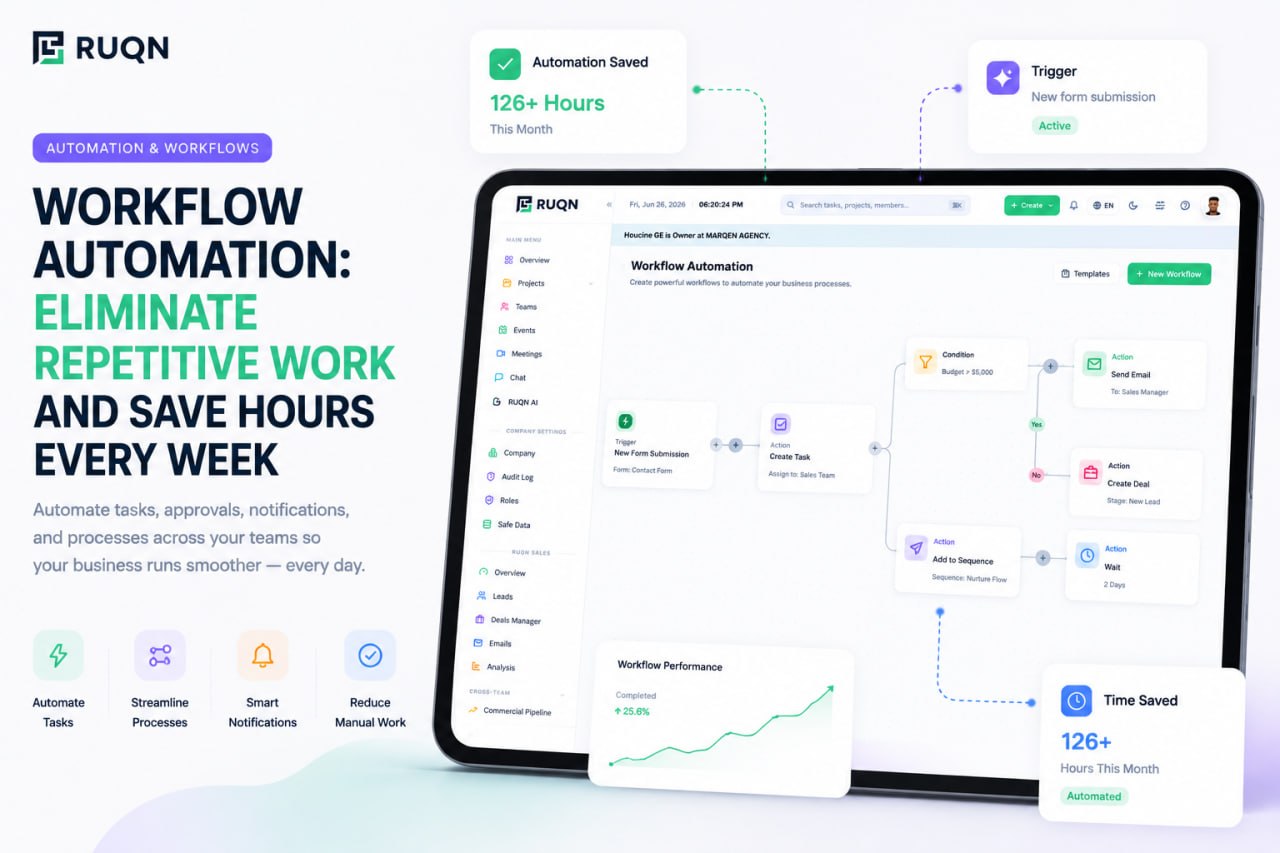
Workflow automation is the practice of letting software carry out the repetitive, rule-based steps in a process so people don't have to. Instead of a person remembering to move a task, notify a teammate, or update a record, the system does it the moment a defined condition is met.
Almost every automation, no matter how simple or sophisticated, is built from three parts:
- A trigger is the event that starts the automation, a task is marked done, a form is submitted, a deal changes stage, a date arrives.
- Conditions decide whether the automation should run and how, only if the task is high priority, only for deals above a certain value, only on weekdays.
- Actions are what the system does in response, assign an owner, send a message, create a follow-up task, update a field, post a summary.
Chain those together and you get a rule you can say out loud: when a client submits a request, if it's tagged urgent, then assign it to the on-call owner and notify the channel. The person who used to do that by hand is now free to do something a machine can't. Automation doesn't replace the work, it removes the connective tissue between steps, the copying, the reminding, the routing, that eats time without adding value.
Why repetitive work is quietly costing your team
The reason automation is easy to postpone is that no single repetitive task feels expensive. Copying a status into a spreadsheet takes fifteen seconds. Reassigning a ticket takes a minute. Chasing a missing approval takes one message. None of it registers as a problem.
The cost hides in the multiplication. A fifteen-second task done forty times a day, five days a week, is more than two hours a week gone, per person, on one tiny action. Now count the dozens of tiny actions a real team performs and the number stops being trivial, it becomes a full role's worth of time spent on work no one chose to do.
There's a second, larger cost that's harder to see: context switching. Every time someone stops focused work to perform a small manual step, they pay a mental tax to get back into flow. The interruption itself is more expensive than the task, the time it takes to ramp back up dwarfs the fifteen seconds the step required. Repetitive manual steps are interruption factories, and focus is the resource they burn.
Then there's the failure mode nobody schedules: the step that gets forgotten. Manual processes depend on human memory, so eventually the follow-up doesn't happen, the hand-off gets dropped, the record goes stale. The cost of that isn't measured in minutes, it's measured in the deal that went cold or the customer who never heard back.
Automation's real return isn't the seconds it saves on each task, it's the focus it protects and the mistakes it never makes.
8 workflows worth automating first
You don't automate a business all at once. You start with the workflows that are frequent, rule-based, and low-risk, the ones where the logic is obvious and the downside of getting it wrong is small. These eight are where almost every team finds its first easy wins.
1. Task assignment and routing
When new work arrives, someone usually decides who owns it. If that decision follows a rule, by type, by client, by workload, it can be automatic. Route incoming requests to the right person or team the moment they land, so nothing sits in an unassigned limbo waiting to be triaged.
2. Status updates and notifications
Keeping people informed is one of the most automated-away tasks in existence. Instead of manually pinging stakeholders, let a status change trigger the update: when a task moves to in review, notify the reviewer; when it's done, tell the requester. The information travels itself, and nobody has to write another "just checking in" message.
3. Approvals and sign-offs
Approvals are pure rules. When an item needs a green light, automation can route it to the right approver, hold the workflow until they respond, and move it forward the instant they do, with a full record of who approved what and when. No more approvals lost at the bottom of an inbox.
4. Recurring task creation
Any work that happens on a schedule, weekly reports, monthly invoicing, quarterly reviews, onboarding checklists, shouldn't be re-created by hand each time. Let the calendar be the trigger and have the tasks appear, pre-assigned and pre-populated, exactly when they're due.
5. Lead capture and CRM updates
When a lead comes in through a form, an automation can create the contact, populate the fields, assign an owner, and start the first follow-up, before anyone has even opened the CRM. This is where a connected sales pipeline earns its keep: the records update themselves instead of waiting on manual data entry that inevitably falls behind.
6. Hand-offs between teams
The riskiest moment in any process is the hand-off, sales to delivery, design to development, support to engineering. Automating the hand-off means the receiving team gets the work with all its context attached automatically, so nothing is lost in translation and nobody has to re-explain what already happened.
7. Reminders and follow-ups
The follow-up that never happens is a silent leak. Automated reminders, and automated follow-up tasks, ensure the next step is always scheduled: nudge the owner before a due date, create a check-in task after a deal stalls, remind a client when you're the one waiting on them.
8. Reporting and digests
Assembling a status report by hand is work about work. A scheduled automation can pull the current state of a project or pipeline and deliver a digest, daily or weekly, to the people who need it, so leaders stay informed without anyone building a slide the night before.
Automation vs. AI: where each fits
It's easy to lump automation and AI together, but they solve different halves of the problem, and knowing which is which keeps you from reaching for the wrong tool.
Automation is for the predictable. When the logic can be written as a rule, if this, then that, automation is faster, cheaper, and more reliable than any human or model. It never gets tired, never forgets, and does exactly the same thing every time. That determinism is a feature: for routing, notifications, and record-keeping, you want boringly consistent behavior.
AI is for the judgment calls. The moment a step requires understanding, summarizing, drafting, or deciding based on messy, unstructured input, a rule can't cover it. That's where AI comes in, reading a long thread and summarizing the decision, drafting a reply that fits the context, extracting the key figures from an attached document, suggesting the next best action.
The most capable systems layer the two. Automation handles the deterministic plumbing, moving work, updating fields, sending notices, and hands the ambiguous parts to AI. When that AI is agentic, meaning it can take actions on your real data within your permissions rather than just answering questions, it becomes a genuine next layer on top of automation: the rules move the work, and the AI handles the parts that used to require a person to stop and think.
How to start automating (without breaking things)
The fastest way to sour a team on automation is to automate a broken or poorly understood process, now the mess just happens faster. A disciplined rollout avoids that. Follow this order:
- Map the process first. Write out the steps of a real workflow exactly as they happen today, including the messy parts. You can't automate what you can't describe, and mapping almost always reveals steps that shouldn't exist at all.
- Find the repetition. Look for the steps that happen the same way every time, the copying, routing, notifying, reminding. Those are your candidates. Anything that requires a real decision each time is not.
- Automate one step. Resist the urge to automate the whole workflow at once. Pick the single most repetitive step, automate just that, and leave the rest manual for now. Small scope means a small blast radius if something is off.
- Measure it. Confirm the automation does what you expected and check the result, is the task really being routed correctly, is the notification landing? Watch it run for a few cycles before you trust it unattended.
- Expand deliberately. Once one step is proven, add the next. Grow the automation one link at a time, and keep a human check on any step where a mistake would be expensive. Automation should earn your trust incrementally, not demand it upfront.
This one-step-at-a-time approach is slower to feel impressive, but it's how automation actually sticks. Each proven step makes the next one safer to add.
Signs you're automating the wrong things
Automation is a tool, not a virtue, and it's entirely possible to overdo it. A few warning signs that you've pointed it at the wrong target:
- You automated a process nobody understood. If the underlying workflow was confusing or broken, automation just industrializes the confusion. Fix the process first.
- The rule needs constant babysitting. If an automation has so many exceptions that someone is always adjusting it, the task probably required judgment and never should have been a rigid rule.
- It removed a useful human checkpoint. Some manual steps exist on purpose, a person reviewing before something reaches a customer, for instance. Automating away a deliberate pause is a downgrade, not an upgrade.
- Nobody can explain what it does. An automation whose logic lives only in one person's head is a liability. If it can't be described plainly, it can't be trusted or maintained.
- It optimized a task that should be eliminated. The best automation is sometimes deletion. Before automating a report nobody reads, ask whether it needs to exist at all.
Good automation makes a good process faster. It can't rescue a bad one, and it shouldn't paper over work that ought to disappear entirely.
Automation that lives where the work already is
Most automation frustration comes from the same root cause: the rules live in one app while the work lives in another. You wire a form tool to a CRM to a chat app to a task board, and now you're maintaining the connections as carefully as the work itself. Every new app is another thing that can break.
RUQN takes a different approach by putting the work in one place to begin with. Because project management, a full sales CRM, and team collaboration share the same workspace and the same data, automation doesn't have to jump between systems, a closed deal can create a project, a status change can notify the right channel, and a new lead can trigger a follow-up, all without a single integration to maintain.
On top of that sits RUQN AI, agentic and opt-in, for the steps that need judgment rather than a rule: summarizing a project, drafting the follow-up, pulling the key numbers out of an attached file. The rules handle the predictable plumbing; the AI handles the thinking, and both operate on the same connected data instead of a brittle chain of tools. If you want to see how it fits together, explore RUQN or start free, with no time limit, and automate your first workflow the same day.
Frequently asked questions
What is workflow automation?
Workflow automation is the practice of letting software handle the repetitive, rule-based steps in a process, so people don't have to do them by hand. Most automations follow a simple pattern: a trigger starts them, conditions decide whether they run, and actions carry out the result, like assigning a task, sending a notification, or updating a record the moment something happens.
What tasks should I automate first?
Start with work that is frequent, follows the same rule every time, and is low-risk if it goes wrong. The easiest early wins are task assignment and routing, status updates and notifications, approvals, recurring task creation, lead capture and CRM updates, hand-offs between teams, reminders and follow-ups, and scheduled reports. Save anything that needs real judgment for later.
Do I need to know how to code to automate workflows?
No. Modern workflow automation is built to be no-code: you define triggers, conditions, and actions in a visual builder using plain language rather than writing scripts. If you can describe the rule in words, you can build the automation, which means the people who run a process can automate it themselves.
What's the difference between automation and AI?
Automation handles predictable, rule-based steps, it does exactly the same thing every time a condition is met. AI handles the judgment calls that can't be written as a fixed rule, like summarizing a thread, drafting a reply, or extracting information from a document. The strongest systems combine them: automation moves the work, and AI handles the parts that require understanding.
How much time can workflow automation actually save?
It depends on how much repetitive work your team does, but the savings compound quickly. A single fifteen-second task repeated dozens of times a day adds up to hours per person each week, and that's before counting the focus you protect by removing interruptions and the mistakes you avoid by never forgetting a step. Most teams find their first automation pays for itself almost immediately.